No App Store Download Needed
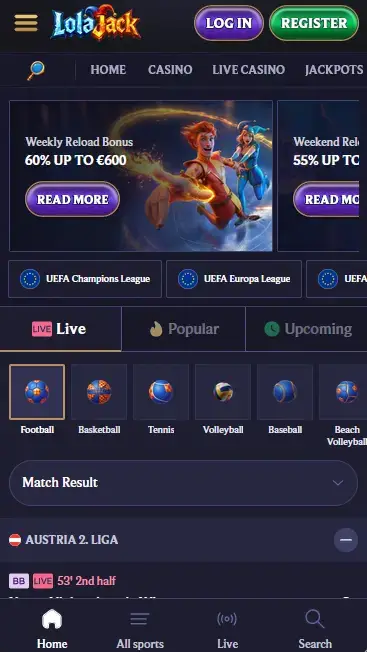
LolaJack runs as a Progressive Web App. Open lolajackcasino24.com in your mobile browser and the full platform is ready, no installation required.
Everything About the App at LolaJack
Full casino, live dealer, and sportsbook in your mobile browser. No download required. Works on Android 8.0+ and iOS 12+ with Interac e-Transfer support.
Full casino, live dealer, and sportsbook in your mobile browser. No download required. Works on Android 8.0+ and iOS 12+ with Interac e-Transfer support.
Full casino, live dealer, and sportsbook in your mobile browser. No download required. Works on Android 8.0+ and iOS 12+ with Interac e-Transfer support.
Open on Mobile Gambling carries a risk of addiction. Players must meet the minimum legal age in their province. Bonus terms and conditions apply.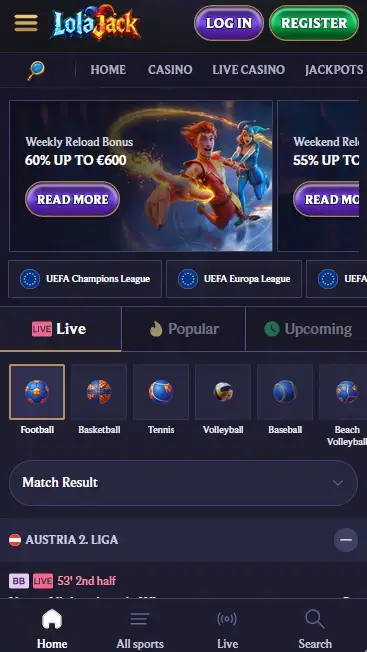
How to Get Started on Mobile
What Makes the LolaJack Mobile Experience Stand Out
No App Store Download Needed
LolaJack runs as a Progressive Web App. Open lolajackcasino24.com in your mobile browser and the full platform is ready, no installation required.
Instant Access to 10,000+ Games
The complete slots, live casino, jackpot, and sportsbook library loads directly in the browser, with no reduction in game count compared to desktop.
256-Bit SSL Encryption on Every Transaction
All deposits via Interac e-Transfer, Visa, or crypto are protected by 256-bit SSL encryption, identical to the security layer on the desktop site.
Staying Safe on the LolaJack Mobile Platform
What You Should Do
What You Should Avoid
LolaJack Mobile: Strengths and Limitations
Pros
Cons
Device Requirements
Android
iOS
Banking at LolaJack is fully operational through the mobile browser, with the same methods and processing times as the desktop site. Canadian players can deposit and withdraw in CAD without currency conversion, using Interac e-Transfer as the primary local option.
The mobile cashier supports Interac e-Transfer, Visa, Mastercard, Skrill, Neteller, Apple Pay, Bitcoin, Ethereum, Litecoin, and USDT. Selecting a method, entering an amount, and confirming the transaction all take place within the mobile browser session. No switching to a separate banking app is required for card or e-wallet deposits.
| Method | Deposit Speed | Withdrawal Time |
|---|---|---|
| Interac e-Transfer | Instant | Up to 24 hours |
| Visa / Mastercard | Instant | 1-3 business days |
| Skrill / Neteller | Instant | Up to 24 hours |
| Bitcoin / Ethereum | Instant | Up to 24 hours |
| USDT | Instant | Up to 24 hours |
All transactions through the mobile cashier are encrypted with 256-bit SSL, the same standard used by major Canadian financial institutions. The account must pass KYC verification before the first withdrawal is processed. For mobile users, the document upload portal in the account settings accepts photos taken directly with the phone camera, making verification straightforward from any device.
The full LolaJack game catalogue of 10,000+ titles is accessible through the mobile browser, with no reduction in selection compared to the desktop experience.
The 8,700+ slot library loads in the mobile browser using HTML5 technology, which means there is no Flash dependency and no plugin installation. High-volatility titles such as Sweet Bonanza (Pragmatic Play, RTP 96.50%), Wanted Dead or a Wild by Hacksaw Gaming, and Money Train 2 from Relax Gaming all run smoothly on a 4G or Wi-Fi connection. Bonus-buy slots that allow players to purchase direct access to the bonus round are available in the mobile lobby where the feature is supported by the game provider.
The live dealer section streams Evolution Gaming, Pragmatic Play Live, and Ezugi tables directly in the mobile browser. Lightning Roulette, Speed Roulette, Crazy Time, Monopoly Live, and Classic Blackjack Pro tables are accessible on mobile with the same betting limits and camera angles as the desktop view. A stable connection of at least 5 Mbps is recommended for uninterrupted HD streaming.
RNG table games including Premium European Roulette and Classic Blackjack Pro load instantly and support touch input for chip placement and card decisions. The 300+ jackpot titles, led by Mega Moolah from Microgaming, are fully accessible and link to the same progressive prize pool regardless of whether they are played on mobile or desktop.
Every promotion available on the desktop site can be claimed and tracked through the mobile browser.
New players who register and make their first deposit via the mobile site receive the same 200% deposit match up to $2,500 plus 150 free spins as desktop users. The minimum deposit of $20 applies, and the 35x wagering requirement on the bonus amount is the same regardless of the device used. Must be 19+ to claim (18+ in Alberta, Manitoba, and Quebec). Full terms and current eligible games for the free spins are on the LolaJack bonus page.
LolaJack does not have a native app in the Google Play Store or the Apple App Store. Access is provided entirely through a Progressive Web App that runs inside the mobile browser. No installation file needs to be downloaded, which means no storage space is consumed and no manual updates are required.
Open Chrome on your Android device (version 8.0 or above) and navigate to lolajackcasino24.com. The site loads in mobile layout immediately. To create a home screen shortcut, tap the three-dot menu in the upper right corner of Chrome and select Add to Home screen. Name the shortcut LolaJack and tap Add. The icon appears on your home screen and opens the site directly when tapped, without showing the browser address bar.
Open Safari on your iPhone or iPad running iOS 12 or later and go to lolajackcasino24.com. The mobile version of the site loads automatically. To add a home screen shortcut, tap the Share button at the bottom of the screen (the box with an upward arrow), then scroll down and select Add to Home Screen. Tap Add to confirm. The LolaJack icon is now on your home screen. Tapping it opens the full platform in a Safari web view that behaves like a standalone app.
On browsers other than Chrome and Safari, the add-to-home-screen option may appear as Install App or as a prompt from the browser menu. The underlying functionality is the same: the shortcut opens lolajackcasino24.com in a condensed browser view without the standard navigation bar.
LolaJack’s mobile platform is optimised for smartphones and tablets running current mobile operating systems. No native app is distributed, so compatibility depends on the mobile browser rather than the device’s app store.
Android 8.0 (Oreo) is the minimum supported version. Devices running Android 9 or later and Chrome 90 or above will have the smoothest experience, particularly for live dealer streaming. Older Android versions may encounter reduced performance on high-frame-rate live tables.
iOS 12 is the minimum supported version, and Safari 14 or above is recommended. iPhones running iOS 15 or later and iPad models from 2018 onward are confirmed to handle the full live casino stream without throttling. Updating to the latest available iOS version is the simplest way to ensure compatibility.
| Feature | Android | iOS |
|---|---|---|
| Minimum OS | Android 8.0 | iOS 12 |
| Recommended browser | Chrome 90+ | Safari 14+ |
| Live casino streaming | 4G / Wi-Fi recommended | 4G / Wi-Fi recommended |
| App Store availability | Not available | Not available |
The mobile version of LolaJack is a direct translation of the desktop experience, not a stripped-down secondary product.
The full game lobby, cashier, promotions centre, live chat, and account settings are all present in the mobile browser. Search and filter tools in the game lobby allow players to sort by provider, category, or feature (for example, filtering to show only Megaways slots or bonus-buy titles). The sportsbook, including live in-play betting on football, basketball, tennis, and esports, is accessible from the main navigation.
The layout adapts to portrait and landscape orientations, with the navigation condensed into a hamburger menu rather than a full top bar. Some bonus promotional banners visible on the desktop homepage may appear as a scrollable carousel on mobile. All core functions remain unchanged.
Tapping Register on the mobile site opens the same registration form as the desktop version. Enter your full name, email address, date of birth, and Canadian mailing address, then set a password. A confirmation email arrives shortly, and clicking the link in that email activates the account. The entire process typically takes under five minutes on a mobile browser.
Returning players tap Sign In, enter their email and password, and complete the 2FA step if enabled. The session is maintained across pages during active play, and the mobile browser will offer to save credentials for faster access on subsequent visits. Full guidance on signing in and troubleshooting common access issues is on the LolaJack login page.
Every connection between your mobile device and lolajackcasino24.com is secured by 256-bit SSL encryption. This applies to account login, game sessions, and all cashier transactions. The protocol prevents third parties from intercepting data on shared networks.
2FA can be activated in the account security settings and works on mobile the same way it does on desktop: a one-time code is sent via an authenticator app or SMS and must be entered after the password at each login from an unrecognised device.
Where the mobile browser supports it, saved credentials can be retrieved using the device’s biometric system (fingerprint or face unlock) through the browser’s native credential manager. This is a browser-level feature rather than a platform-specific one, and availability depends on the device and browser combination in use.
Live chat is available directly through the mobile browser at any time, with no need to switch to desktop for assistance. Email support reaches the team at [email protected]. Both channels are staffed 24 hours a day, seven days a week, covering Eastern, Central, Mountain, and Pacific time zones.
Deposit limits, daily loss limits, session reminders, and self-exclusion options are accessible through the account settings on the mobile site. Players who want to set a break or a permanent exclusion of up to 12 months can do so independently at any time without contacting support. The responsible gambling tools operate identically on mobile and desktop.
LolaJack App FAQ
No. LolaJack operates as a Progressive Web App, meaning you access the full platform through your mobile browser at lolajackcasino24.com, with no download from Google Play or the App Store required.
The mobile site is compatible with Android 8.0 and above, using Chrome 90 or a later browser version for the best performance.
Yes. Interac e-Transfer is fully supported through the mobile browser cashier, allowing you to deposit and withdraw in CAD without switching to a desktop.
Open LolaJack in Your Mobile Browser
Grab 200% up to $2,500 and 150 free spins.
Enter the Casino Gambling carries a risk of addiction. Players must meet the minimum legal age in their province. Bonus terms and conditions apply.